
Download USB Drive Data Recovery – Free, Secure Tool to Recover Lost Files from USB Drives
What Is USB Drive Data Recovery? A Reliable Solution for Lost Files
USB Drive Data Recovery is a specialized utility designed for users who have accidentally deleted files, formatted a USB drive, or experienced corruption that led to data loss. Despite its age, this tool remains a viable option for recovering valuable documents, photos, music, and videos from USB flash drives, especially on older Windows systems. The software is lightweight—only 1.52 MB in size—making it ideal for low-resource environments. It’s particularly useful for users still running legacy systems like Windows 95, 98, or ME, where modern recovery tools may not function properly.
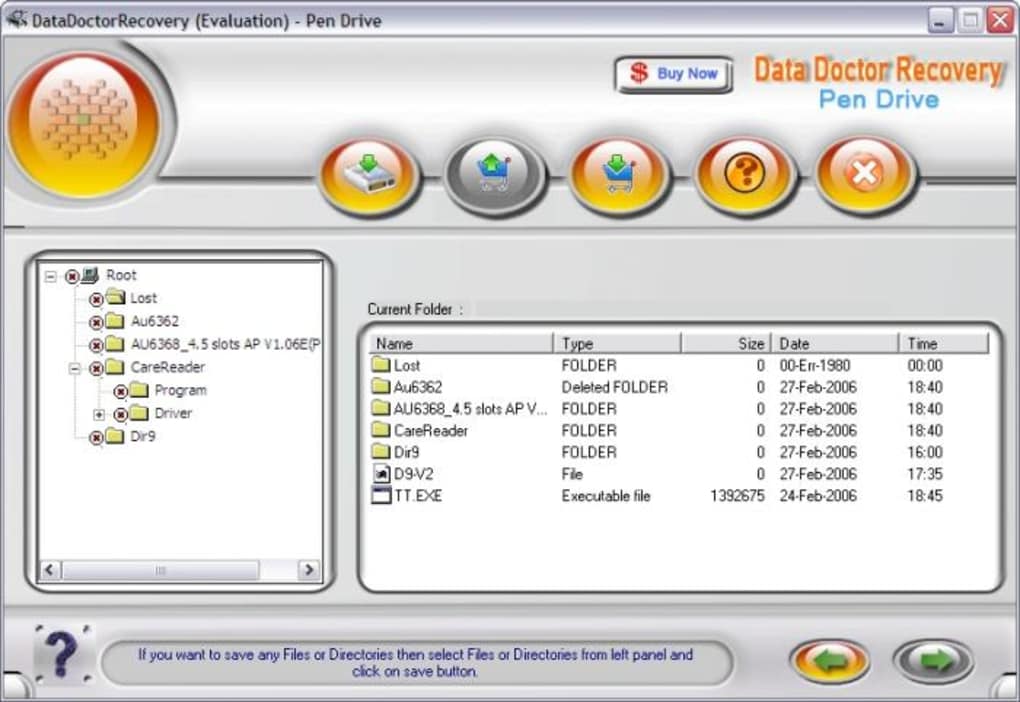
Although the software was last updated in 2009, its core functionality remains effective for basic recovery tasks. The interface is simple and intuitive, resembling classic Windows applications, which makes it accessible even for users unfamiliar with advanced data recovery tools. A left-side drop-down menu allows quick navigation through folders and subdirectories, displaying file details such as date created, file size, and type. This feature is especially helpful when trying to locate specific files among hundreds of entries.
One of the key strengths of USB Drive Data Recovery is its minimal system footprint. It doesn’t require significant hard drive space or processing power, which is a major advantage on older machines. The trial version is completely free to install, allowing users to test its capabilities before purchasing the full version. However, it’s important to note that full access to all features—including advanced recovery modes and export options—requires a paid license. Despite its limitations, this tool is still a solid choice for those working with outdated systems and need a no-frills recovery solution.
Key Features and How to Use USB Drive Data Recovery Effectively
USB Drive Data Recovery offers a set of practical features tailored to the needs of users dealing with lost or corrupted USB data. The software’s primary function is to scan and recover deleted or inaccessible files from USB drives, pen drives, and memory sticks. Its user-friendly interface ensures that even non-technical users can navigate the recovery process with ease. The main screen features a clean layout with a left-side navigation panel that lists all available drives and folders, allowing users to browse through their contents efficiently.
One of the standout features is the detailed file information display. Each file shows metadata such as creation date, file size, and format (e.g., JPEG, DOC, MP3), helping users identify important files quickly. Users can preview file contents directly within the tool before deciding to recover them. This reduces the risk of restoring unnecessary or corrupted files. The software also supports a wide range of file types, including documents, images, audio, video, and compressed archives—making it versatile for different use cases.
Another useful feature is the ability to export recovered files to a specified destination, such as a folder on the computer’s hard drive. This ensures that recovered data is safely stored and not overwritten on the original USB drive. The recovery process is straightforward: connect the USB drive, launch the software, select the drive, initiate a scan, and review the results. The trial version allows users to scan and view recoverable files, but only the licensed version enables actual recovery and export.
- Scan and recover deleted or lost files from USB drives
- Supports multiple file formats: DOC, XLS, JPEG, MP3, MPEG, AVI, WAV, ZIP, PPT, CDX
- Simple, intuitive interface similar to classic Windows programs
- Displays file metadata: date, size, and type
- Preview files before recovery to ensure accuracy
- Export recovered files to a safe location on your computer
Compatibility, Installation, and Best Practices for Use
USB Drive Data Recovery is specifically designed for older Windows operating systems, including Windows 95, 98, ME, and earlier versions. It is not compatible with modern systems like Windows 10, 11, macOS, Android, or iOS. This limitation is crucial to understand before downloading or installing the software. If you’re using a current device, you’ll need to consider alternative tools such as Pen Drive Recovery Wizard or USB Flash Drive Data Recovery, which support modern platforms.
Installation is quick and straightforward. Simply download the 1.52 MB installer, run it, and follow the on-screen prompts. The software doesn’t require administrative rights or complex configurations, making it ideal for users with limited technical knowledge. Once installed, connect your USB drive to the computer and launch the application. The software will automatically detect the connected drive, allowing you to select it for scanning.
To maximize recovery success, it’s essential to act quickly after data loss. Avoid writing new data to the USB drive, as this can overwrite deleted files and reduce the chances of successful recovery. Use the trial version to scan the drive and preview files before purchasing the full license. For best results, use the software on a system with minimal background processes to ensure stable performance. While the tool is lightweight, running other heavy applications simultaneously may affect scan accuracy.
Despite its age, USB Drive Data Recovery remains a dependable option for users still operating on legacy systems. Its simplicity, low resource usage, and proven recovery methods make it a valuable tool in niche scenarios where modern alternatives aren’t viable.
Pros and Cons: Is USB Drive Data Recovery Worth It?
Pros
- Lightweight and fast—only 1.52 MB in size
- Easy-to-use interface, ideal for beginners
- Compatible with Windows 95 and earlier systems
- Free trial version available for testing
- Supports a wide variety of file types
- Displays detailed file information for better decision-making
Cons
- Not compatible with modern operating systems
- Only available in English
- Full features require a paid license
- Last updated in 2009—no recent improvements or security updates
- Limited to basic recovery modes (no deep scan or advanced options)
Frequently Asked Questions (FAQ)
Can I use USB Drive Data Recovery on Windows 10 or Windows 11?
No, USB Drive Data Recovery is not compatible with Windows 10, 11, or any newer operating systems. It was designed for Windows 95 and earlier versions. For modern systems, consider using updated tools like Pen Drive Recovery Wizard or USB Flash Drive Data Recovery, which support current platforms.
Is the trial version really free to use?
Yes, the trial version is completely free to download and install. It allows you to scan your USB drive and preview recoverable files. However, you cannot export or save recovered files unless you purchase the full license.
What file types can be recovered?
The software supports a wide range of file formats, including DOC, XLS, JPEG, MP3, MPEG, AVI, WAV, ZIP, PPT, and CDX. This makes it suitable for recovering documents, images, audio, video, and compressed files.
How do I increase my chances of successful data recovery?
To improve recovery success, avoid using the USB drive after data loss. Stop writing new data to it immediately. Use the software on a stable system with minimal background processes, and perform the scan as soon as possible after the incident.
Where can I get support if I have issues with the software?
For technical support or inquiries, contact the developer at [email protected]. Note that support may be limited due to the software’s age and discontinued updates.
Final Verdict: A Niche Tool with Lasting Value
USB Drive Data Recovery is a dependable, lightweight tool for users still relying on older Windows systems. While it lacks modern features and support for current operating systems, its simplicity, low resource usage, and proven recovery methods make it a solid choice for legacy environments. The free trial allows users to test its capabilities without risk, and the ability to preview files before recovery adds a layer of confidence.
If you’re using Windows 95, 98, or ME and have lost data on a USB drive, this software could be your best bet. However, for users on modern platforms, it’s strongly recommended to explore updated alternatives like Pen Drive Recovery Wizard or USB Flash Drive Data Recovery, which offer better compatibility, security, and recovery performance.
Download USB Drive Data Recovery today if you’re working with legacy systems. For others, consider upgrading to a modern data recovery tool to ensure safe, secure, and effective file restoration.
Home Software Data Recovery Tools






